Overview
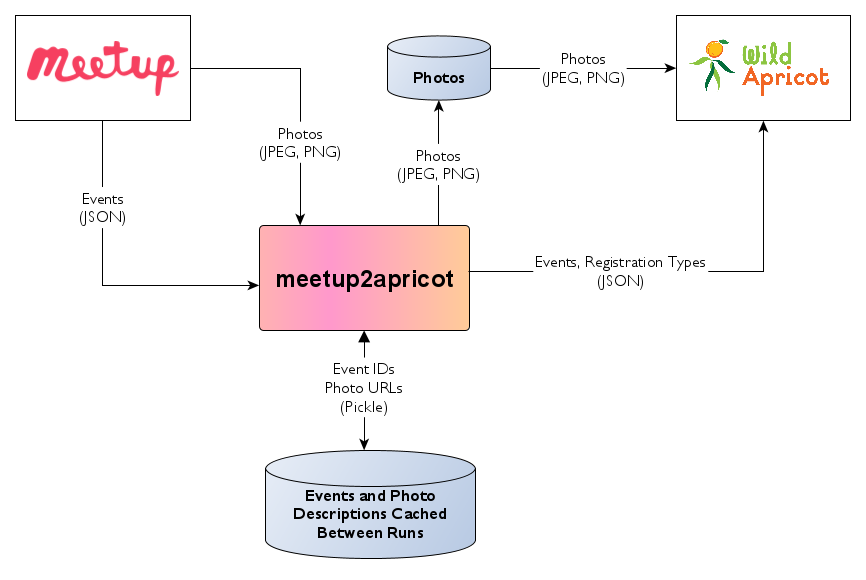
Figure 4. Meetup2apricot retrieves event data and photos from Meetup, transforms the data, uploads photos to Wild Apricot, and adds events and registration types to Wild Apricot.
Meetup2apricot is a command line program that retrieves event descriptions from Meetup and adds them to Wild Apricot. Meetup2apricot also downloads featured event photos from Meetup and uploads them to Wild Apricot. Figure 4 shows event data flow from Meetup to Wild Apricot.
Preparation
Meetup2apricot run on any computer running Linux or a similar operating system. An administrator will need some basic computer skills to install and configure meetup2apricot. See Prerequisites for a description of the computing and skills requirements.
Meetup2apricot accesses the Xibo API as a distinct authorized application. See Wild Apricot Application Authorization for instructions about adding and authorizing this application.
Installation
Meetup2apricot can be installed with standard Python package tools. A makefile automates the installation. See Installation.
Configuration
Meetup2apricot gets its configuration from environment variables. The configuration includes:
Meetup API settings
Wild Apricot API credentials
Date/time thresholds for event conversion
Event tagging
Registration restrictions
Paths to local and remote files and directories
The meetup2apricot man page defines the configuration environment variables. Configuration explains the environment variables in more detail. An annotated example configuration script, /data/run_sample.env, provides a starting point for customization.
Logging
Meetup2apricot can log its activity to a named file, standard output, or both. Command line options control the message levels to log and where to send the logs.