Configuration
As recommended in The Twelve-Factor App, meetup2apricot gets its configuration from environment variables. The meetup2apricot man page defines the configuration environment variables. The configuration includes:
Meetup API settings
Wild Apricot API credentials
Date/time limits for event conversion
Event Registration Restrictions
Event tagging
Paths to local and remote files and directories
On Linux, a configuration shell script is a common way to provide environment
variables.
An annotated example configuration script, /data/run_sample.env,
provides a starting point for customization.
This file also is included with the downloaded or cloned source files in the
/data directory.
Customize a copy with a different name.
The configuration script includes sensitive authorization data, so allow access only to the user running meetup2apricot. (The sample configuration script contains sanitized data.)
For example, this chmod command gives the user read and write permissions, and removes permissions from group members and other users:
$ chmod u=rw,go-rwx run.env
Meetup API Settings
Meetup2apricot requests events for a specific Meetup group.
The Meetup API use a computer-friendly group URL name instead of the actual group name.
Locate the group URL name in a web browser address line, as shown in
Figure 9.
Environment variable MEETUP_GROUP_URL_NAME provides the URL group
name.
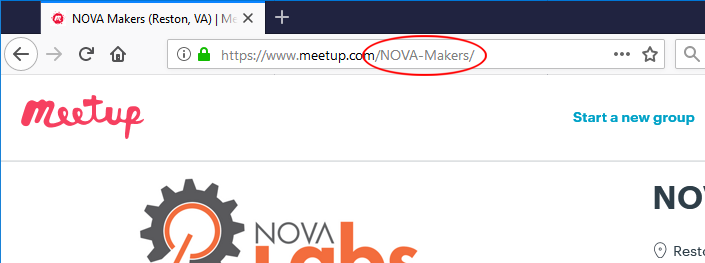
Figure 9. The Meetup group URL name, “NOVA-Makers” circled in red, is the last part of the group’s Meetup URL.
By default, the Meetup API returns data about the next 200 upcoming events. In early November 2020, when conversions began, this provided almost a year of future events, mostly repeated events automatically scheduled by Meetup. Experiments determined that 100 upcoming events would provide about 60 days of events.
Rather than rely on the Meetup default, environment variable
MEETUP_EVENTS_WANTED specifies the number of upcoming events wanted
from Meetup.
Wild Apricot API Credentials
Wild Apricot authenticates client applications with OAuth2.
The client application, meetup2apricot, needs an API key.
When a Wild Apricot administrator adds or edits an application, Wild Apricot
reveals the API key as described in Authorizing External Applications.
The environment variable APRICOT_API_KEY provides the necessary
credential to meetup2apricot.
Wild Apricot Application Authorization explains how to authorize the
meetup2apricot application and obtain its API key.
Wild Apricot Photo Uploading
Wild Apricot authenticates event photo uploads with a username and password
authorized to add files via the administration web interface.
Environment variables APRICOT_PHOTO_USERNAME and
APRICOT_PHOTO_PASSWORD provide the credentials.
For example:
# Wild Apricot username with file uploading authorization
export APRICOT_PHOTO_USERNAME="someone@nova-labs.org"

# Wild Apricot password for the username
export APRICOT_PHOTO_PASSWORD="zvbxrpl"
Meetup2Apricot uploads event photos to a resource folder under Nova Labs’ base
URL at Wild Apricot.
The environment variable APRICOT_PHOTO_BASE_URL provides the base URL.
For example:
# Base URL for uploading photos to Wild Apricot
export APRICOT_PHOTO_BASE_URL="https://portal.nova-labs.org"
Wild Apricot Paths
Several Wild Apricot API requests include Nova Labs’ Wild Apricot account
number in their URL paths.
The environment variable APRICOT_ACCOUNT_NUMBER provides the account
number to meetup2apricot.
For example, specify this account number found in the Wild Apricot account
settings shown in Figure 10:
# Wild Apricot account number
export APRICOT_ACCOUNT_NUMBER='123456'
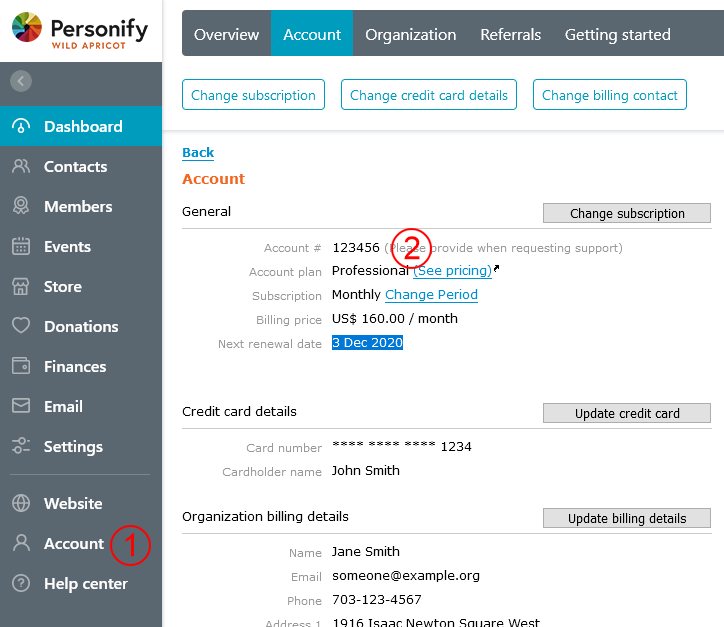
Figure 10. Within the Account section of the Wild Apricot web administration interface (1), copy the account number (2).
Event photos will be uploaded to a subdirectory in the Wild Apricot web site
static resources area.
The environment variable APRICOT_PHOTO_DIRECTORY specifies the path
to that subdirectory.
For example, specify this directory path for the event announcements photos
folder shown in Figure 11:
# Wild Apricot web directory for photos
export APRICOT_PHOTO_DIRECTORY='/resources/Pictures/EventAnnouncements'

Figure 11. Within the Settings/Files section of the Wild Apricot web administration
interface (1), a directory tree shows
/resources/Pictures/EventAnnouncements (2) containing event photos (3).
Local Paths
Event photos will be downloaded from Meetup into a local directory for
inspection and for later uploading to Wild Apricot.
The environment variable PHOTO_DIRECTORY specifies the path
to that directory.
Meetup2apricot saves some information between runs about events and photos previously processed. Table 1 lists the related environment variables and their purpose.
Environment Variable |
Purpose |
|---|---|
Path to cache file containing event information |
|
Path to cache file containing photo information |
Event Registration Restrictions
Wild Apricot can restrict event registrations to selected membership levels. For example, the Nova Labs Green Orientation is restricted to “Membership Application” members. Wild Apricot also can restrict guest registrations and collect more or less guest information.
Environment variable EVENT_RESTRICTIONS specifies a JSON formatted
list of restrictions.
For example:
export EVENT_RESTRICTIONS='[
    {
            "name": "Register",
            "pattern": "go:.*orientation",
            "levels": "Membership Application"
    },
    {
            "name": "Members Only",
            "pattern": "members[ -]*only",
            "levels": [
                    "Associate",
                    "Associate (legacy-billing)",
                    "Innovation Center",
                    "Key",
                    "Key (family)",
                    "Key (family-minor-16-17)",
                    "Key (legacy-billing)",
                    "Volunteer Staff"
            ]
    },
    {
            "price": "paid",
            "guests": "contact"
    }
]'
As it processes each event, meetup2apricot scans the restriction list in order, looking for the first restriction with a pattern found in the event name and a price category matching the event. When a restriction matches the event, meetup2apricot creates an event registration type with the name, membership levels, and guest policy provided. If no restriction matches an event, meetup2apricot creates an event registration type with the defaults shown in Table 4.
Letter case is ignored in the regular expression name patterns, so Members Only, members only, and MEMBERS ONLY all match the second example pattern. If no name pattern is provided, all events match.
The Wild Apricot registration type is restricted to the member level or list of member levels provided. If no member levels are provided, the registration type will accept nonmembers and all member levels.
The guest policy controls whether guests are allowed and what guest information gets collected by the registration form. If no guest policy is provided, guests may not register. The guest policy can be one of:
count: Collect only the number of guests.contact: Collect contact information for each guest.full: Collect full registration information for each guest.
Event Tags
Wild Apricot events can be tagged to aid searching and filtering. For example, the Wild Apricot event list could be filtered by the woodworking tag to prepare a list of upcoming wordworking classes.
Meetup2apricot can apply specified tags to all events copied from Meetup to
Wild Apricot.
Some possible tags might be new, to indicate new events; meetup, to
indicate events from meetup; and review, to indicate events requiring review
by an administrator.
Environment variable ALL_EVENT_TAGS specifies a JSON formatted list
of tags to apply to all events.
For example:
export ALL_EVENT_TAGS='["new", "meetup", "review"]'
Provide an empty list when no tags apply to all events:
export ALL_EVENT_TAGS='[]'
Meetup2apricot can translate accounting codes from event name into Wild
Apricot event tags.
The Nova Labs wiki contains the authoritative list of accounting
codes and their event tags.
Environment variable CODES_TO_TAGS specifies a JSON formatted object
with accounting codes as keys and tags as values.
Tag values may be individual strings or a list of strings.
For example:
export CODES_TO_TAGS='{
    "3D": "3d-printing",
    "AC": "arts-and-crafts",
    "EL": "electronics",
    "RO": ["electronics", "3d-printing"],
    "SL": "3d-printing",
    }'
Meetup2apricot would extract accounting code RO from event name “RO: Robot
Group Meetup” and use the CODES_TO_TAGS mapping to apply tags electronics
and 3d-printing to the event.
Meetup2apricot applies the accounting code as an event tag to support integration with the Nova Labs accounting system.
Event Time Limits
Nova Labs plans to use meetup2apricot from November 10, 2020 through the end of the year..
Environment variables EARLIEST_EVENT_START_TIME and
LATEST_EVENT_START_TIME specify the earliest and latest start times
for events converted by meetup2apricot.
Specify times (and dates) in ISO 8601 format including a timezone offset.
For example:
# Earliest event start time to convert
export EARLIEST_EVENT_START_TIME="2020-11-10 00:00 -05:00"

# Latest event start time to convert
export LATEST_EVENT_START_TIME="2020-12-31 23:59 -05:00"
To convert all upcoming Meetup events, choose an earliest time in the past and a latest time years in the future.